Most writing tools want to be everything—editor, formatter, grammar checker, publisher. That’s fine if you’re revising. But what if you’re just trying to write?
That’s where TypeSlate comes in.
It’s not a word processor. It doesn’t open files or style text. It doesn’t correct your grammar. It doesn’t nudge you with suggestions.
It exists for one purpose: to help you capture words .
No toolbars. No distractions. No cloud sync. Just a fullscreen page, a goal, and your own discipline.
Why “Word Capturer” Matters
This term may sound new—but it’s exactly what separates TypeSlate from traditional apps.
Instead of organizing your ideas, it lets you free them .
Instead of editing as you go, it lets you write without judgment .
And it comes with features designed not to make writing easier, but to make it inevitable .
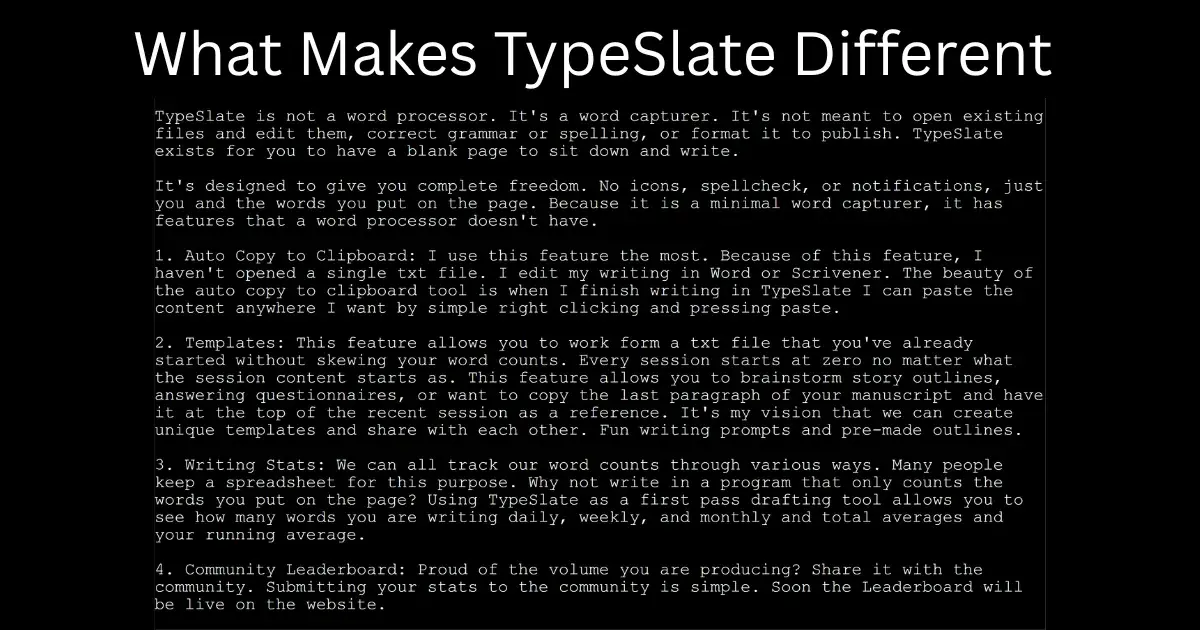
Here’s what makes TypeSlate radically different:
1. Auto Copy to Clipboard: Write Once, Paste Anywhere
No need to open files. No save-as dialog. When your session ends, everything you wrote is copied to your clipboard .
I personally use this feature every day. It lets me:
- Paste into Scrivener for structuring
- Paste into Word for editing
- Paste into ChatGPT for review or idea expansion
Just write, close, and paste. Done.
2. Templates Without Word Count Bloat
TypeSlate’s template feature lets you load reference content without cheating your stats .
Every writing session starts at zero—even if you preload:
- Your last manuscript paragraph
- A story outline or writing prompt
- Character profiles or journaling cues
This makes TypeSlate a great tool for:
- Fiction drafting
- Morning Pages
- Structured brainstorming
And yes—we’re working on a way for users to share templates. Think: community prompts, genre-specific outlines, daily writing challenges.
3. Honest Writing Stats: Only Count What You Type
Many writers use spreadsheets to track their word counts.
But why not use a tool that tracks only the words you actually wrote ?
TypeSlate gives you:
- Daily, weekly, and monthly word totals
- Rolling averages
- True insight into your creative output
No cheating. No imports counted. Just your original effort, tracked automatically.
4. Community Leaderboard (Coming Soon!)
Writing can feel isolating—but it doesn’t have to be.
Soon, you’ll be able to opt in to share your stats with the TypeSlate community. Track your streaks, see your growth, and get inspired by other writers.
Whether you're chasing 50,000 words for NaNoWriMo or 100 words a day, the leaderboard turns discipline into friendly motivation.
5. Word Count & Timer Lock: Discipline by Design
TypeSlate comes with two “write-until” modes:
- Word Count Mode : Set a target (like 750 words), and you can’t leave the screen until you hit it.
- Timer Mode : Set a duration (say, 20 minutes), and stay focused until it ends.
Perfect for:
- Morning journaling habits
- Writing sprints with peers
- Fiction writers building stamina
These tools aren’t gimmicks. They’re there to build your writing muscle , one session at a time.
Try TypeSlate Free for 30 Days
Focus Better with TypeSlate
TypeSlate is a fullscreen writing app that locks out distractions and helps you finish what you start.
Download FreeWhether you're a novelist, journaler , blogger, or just someone trying to write more honestly— TypeSlate is built for you .
- No cloud.
- No subscription.
- No fluff.
Just you, the screen, and the words you choose to write.
Try it free for 30 days. If it’s not for you, no problem. But if it clicks, you’ll pay just $20 once—and own your writing ritual for life.